
AI Coding Assistant for Enterprise: How to Choose Beyond GitHub Copilot
Choosing an AI coding assistant for enterprise use comes down to control, not code suggestions. The right tool keeps your code out of model training and offers IP protection. It also fits your identity systems and runs where your data rules allow. GitHub Copilot, Amazon Q Developer, Gemini Code Assist, and Tabnine handle these needs differently.
Most teams find this out after the pilot. Developers like the tool, then security asks what code leaves the network, legal asks about licensed snippets, and the rollout freezes. Teams planning generative AI and ML engineering work avoid that freeze by setting enterprise criteria before they buy seats.
This guide compares the main enterprise options on security, data retention, licensing, and IP protection, then gives you a checklist to choose. By the end of this guide, you’ll know which assistant fits your security rules and how to roll it out without surprises.
Key Takeaways: Choosing an AI Coding Assistant for Enterprise
Use this as a first shortlist for an AI coding assistant for enterprise use, then test the finalists against the checklist further down.
| If this describes you | Shortlist first |
|---|---|
| Your code already lives in GitHub Enterprise | GitHub Copilot Business or Enterprise |
| Your stack runs mostly on AWS | Amazon Q Developer Pro |
| Your stack runs mostly on Google Cloud | Gemini Code Assist Standard or Enterprise |
| Code must stay inside your network, including air-gapped sites. | Tabnine Enterprise (private installation) or Tabby |
| Legal wants IP indemnity in the contract. | GitHub Copilot Business or Enterprise, Amazon Q Developer Pro, or Gemini Code Assist |
| Engineers want agents that edit across the whole repository | Cursor or Claude Code on an enterprise plan |
What Is the Primary Focus of AI Coding Assistants Like GitHub Copilot?
AI coding assistants like GitHub Copilot focus on helping developers write and change code faster inside the editor. They suggest code as you type, answer questions in chat and increasingly carry out multi-step tasks as agents.
The productivity case is well documented. In a controlled GitHub study published in 2022, developers using Copilot finished a coding task 55% faster than those without it.
Adoption at large companies has followed. Alphabet CEO Sundar Pichai said in October 2024 that AI generated more than a quarter of all new code at Google. Engineers then reviewed and accepted it.
That focus on individual speed is the starting point, not the finish line. An AI coding assistant for enterprise teams needs the same speed with controls a security team can sign off on.
Why Enterprises Need AI Coding Tools That Work for Teams Rather Than Individuals
GitHub Copilot was a pioneering AI coding assistant, and it demonstrated how generative AI can boost developer productivity by suggesting code and automating boilerplate.
However, large enterprises have considerations that go beyond individual productivity gains. While Copilot and similar tools are powerful, relying on a third-party cloud AI service can raise security and compliance flags in enterprise environments.
That is why vendors now sell business tiers with admin, privacy and IP terms that personal plans often lack.
1. Data Privacy and Security Concerns
Enterprises handle sensitive code and customer data, so none of it can leak through AI tools. Samsung banned staff from tools like ChatGPT after confidential code ended up in a prompt. GitGuardian’s 2025 State of Secrets Sprawl report found public repositories using Copilot leaked secrets about 40% more often than average.
2. Compliance and Legal Issues
Beyond privacy, enterprises worry about regulations such as GDPR and about software licensing. Many coding models learned from public code, including code under restrictive licenses. That raises a fair question: could a suggestion reproduce licensed code? IP indemnity and public-code filters exist to answer it.
3. Need for Customization
General-purpose suggestions don’t know your internal frameworks or coding standards out of the box. Enterprise developers spend much of their time on legacy systems, where that gap hurts most. Business tiers now add context from private repositories, which matters most in legacy code modernization.
4. Seat, Policy and Usage Management
Personal plans leave each developer to manage their own settings. Team plans add central billing, policy settings, usage reports and single sign-on. Without them, IT cannot see who uses which tool, or with what data.
In short, the question is no longer whether to use an AI coding assistant for enterprise work. It is which plan gives security, legal and platform teams the controls they need. Before comparing tools, it helps to define what “enterprise-grade” means.
Also Read: AI Agents vs AI Assistants: What Enterprises Need to Know
Key Features of Enterprise-Grade AI Coding Assistants
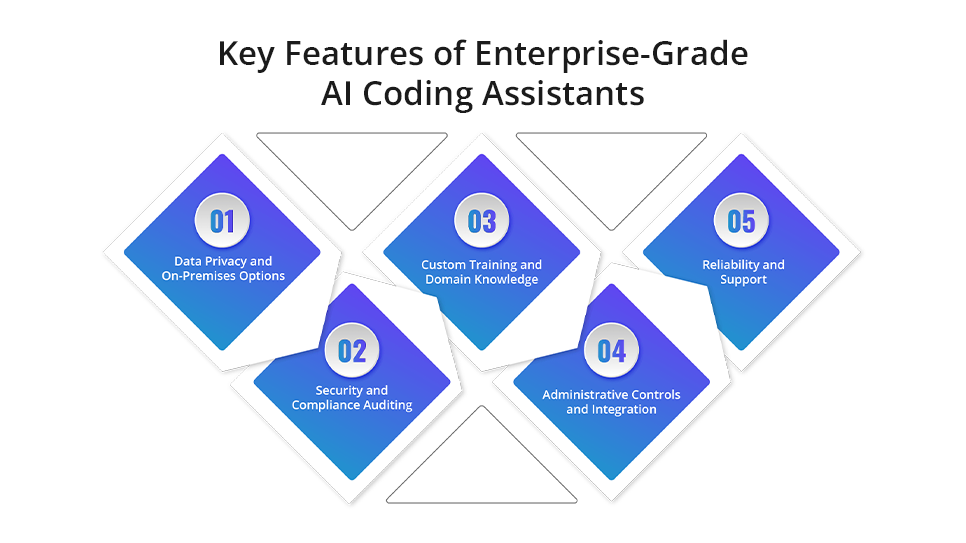
Not all generative AI-enabled software development tools are equal, especially when it comes to enterprise needs. Here are the features that separate an AI coding assistant for enterprise use from standard tools:
1. Data Privacy and On-Premises Options
Enterprise AI tools must offer strong data privacy guarantees, and some let you keep code off external services entirely. Tabnine, for example, offers VPC, on-premises and fully air-gapped private installations for enterprise customers. Cloud tools should at least commit, in writing, not to train on your code.
2. Security and Compliance Auditing
An enterprise-grade assistant should help you keep code secure and compliant, not quietly add vulnerabilities. Some tools now include security scanning. Amazon Q Developer, formerly Amazon CodeWhisperer, has built-in scanning for vulnerabilities in languages such as Python, Java and JavaScript.
3. Custom Training and Domain Knowledge
Drawing on your internal code and knowledge is what lifts suggestion quality. Amazon Q Developer customizations connect your private repositories, with admins controlling who can use each one. Gemini Code Assist Enterprise tailors responses based on your private code repositories.
4. Administrative Controls and Integration
Enterprise software needs to integrate with corporate IT systems. Look for AI coding tools that support single sign-on (SSO), role-based access control, and audit logging. Enterprise versions usually add an admin console to manage licenses, see usage statistics and enforce policies across the team.
5. Reliability and Support
When deploying AI tools at scale, enterprises need vendor support, SLAs and reliability. Enterprise plans typically add dedicated support, onboarding help and training resources that free tools lack. Check offline update paths for private installations and support for every IDE your teams use.
By ensuring these features are in place, organizations can adopt AI coding assistants knowing they align with corporate governance and standards. Coding assistants are also LLM systems, so the risks in our guide to LLM security risks and enterprise AI protection apply here too.
Choosing an AI coding assistant for enterprise rollout? Our AI engineers can run a scoped pilot on one team and measure the results before you buy seats at scale. Get In Touch to plan your pilot.
What Are the Best Alternatives to Coding Copilots for Enterprise AI Development?
The main GitHub Copilot alternatives for enterprise teams are Amazon Q Developer, Gemini Code Assist, Tabnine and self-hosted tools such as Tabby. Agent-style tools like Cursor and Claude Code are a newer option for teams that want broader automation.
1. Amazon Q Developer
Amazon’s coding assistant, formerly Amazon CodeWhisperer, suits AWS-centric organizations. It has a free tier, and the Pro tier adds IP indemnity, IAM Identity Center support and an admin dashboard. AWS states it does not use Pro content for service improvement.
2. Tabnine Enterprise
Tabnine has oriented itself toward enterprise needs. Beyond its secure SaaS option, enterprise customers can run it in their own VPC, on-premises or fully air-gapped. Tabnine says it never retains or trains on your code. Its own models are trained only on permissively licensed open-source code.
3. Gemini Code Assist
Google’s assistant suits teams that build on Google Cloud. Google treats both the Standard and Enterprise editions as a generative AI indemnified service. It also says it doesn’t train on your data without permission. Enterprise adds code customization from private repositories.
4. Tabby and Other Self-Hosted Options
For organizations with very strict compliance rules, an open-source assistant running internally is an option. Tabby is an open-source, self-hosted AI coding assistant that your team controls completely. You own the hardware, the model choice and the upkeep.
5. Agent-Style Coding Tools
Agent-style tools plan and edit across a whole repository, not just the current file. Cursor turns Privacy Mode on by default for enterprise teams, and the Claude Enterprise plan includes Claude Code with SSO and SCIM. Our roundup of AI code enhancement tools covers Cursor, Codeium, Replit, Bolt and Lovable in more depth.
The landscape of AI developer tools changes quickly, so recheck the plans and terms of any AI coding assistant for enterprise use before every renewal. The key is to choose a tool that matches your priorities, whether that is data security, ecosystem fit, cost or customization.
Features and names only go so far. Licensing terms decide what your legal and finance teams will actually sign.
Enterprise Licensing Options for AI-Powered Coding Assistants
Most enterprise licensing for AI-powered coding assistants is per user, per month, with usage limits or credit pools on top. IP indemnity and no-training terms usually start at the business tier, not the free or personal plans.
| Tool and plan | List price per user per month | Deployment options | Data retention and training | IP protection | Admin and security controls |
|---|---|---|---|---|---|
| GitHub Copilot Business | $19 per seat, with a pooled 1,900 AI credits per user | Cloud service run by GitHub | GitHub says it does not use Business data to train its models | IP indemnity when the “matching public code” setting is blocked | Central policy management and content exclusion |
| GitHub Copilot Enterprise | $39 per seat, with a pooled 3,900 AI credits per user | Cloud service run by GitHub | Same terms as Business | Same terms as Business | Everything in Business, plus priority access to new models and features |
| Amazon Q Developer Pro | $19 | AWS cloud service | AWS says it does not use Pro content for service improvement | IP indemnity included | IAM Identity Center support and an admin dashboard |
| Gemini Code Assist Standard | $19 on a 12-month commitment | Google Cloud service | Google says it doesn’t train on your data without permission | Covered as a generative AI indemnified service | VPC Service Controls support |
| Gemini Code Assist Enterprise | $45 on a 12-month commitment | Google Cloud service | Same terms as Standard | Same terms as Standard | Adds code customization from private repositories |
| Tabnine Enterprise | Not published on pages we could check | Secure SaaS, VPC, on-premises or fully air-gapped | Tabnine says it never retains or trains on your code | Own models trained only on permissively licensed code | Private installations send no code to Tabnine’s servers |
| Tabby | Open-source software, so you pay for your own hardware | Self-hosted on your own servers | Your team controls all data | Depends on the model you choose to run | Whatever controls you set up around it |
These are vendor list prices, not Fx31 Labs pricing, and they change often. Sources: GitHub Copilot plans, Amazon Q Developer pricing and Gemini for Google Cloud pricing. Google publishes hourly rates, shown here at 730 hours a month.
GitHub bills usage above the pooled credits at $0.01 per AI credit. It also offers a Copilot access option for eligible enterprises, with metered usage from first use. GitHub’s IP indemnity applies only when admins block suggestions that match public code.
Also Read: Modernizing Legacy Codebases: Frameworks, Costs, and Success Metrics
How to Choose an Enterprise AI Coding Assistant: A 10-Point Checklist
Use these ten questions to compare each AI coding assistant for enterprise use on equal terms. Secure AI coding tools for enterprise use pass the first four in writing, not just in a sales deck.
| Sr.No | Question to ask | What a good answer looks like |
|---|---|---|
| 1 | Is our code used to train any model? | A written no-training commitment for your plan, ideally in the contract |
| 2 | How long are prompts and suggestions retained? | A stated retention period or zero retention, with logging you control |
| 3 | Does the plan include IP indemnity, and on what conditions? | Indemnity in writing, plus any required setting such as a public-code filter |
| 4 | Where can the assistant run? | A deployment option that matches your data rules: cloud, VPC, on-premises or air-gapped |
| 5 | Does it connect to our identity provider? | SSO and automated user provisioning, so access follows your directory |
| 6 | What can admins control? | Policy settings, content exclusion, model choice and usage reports |
| 7 | Can it use our private repositories safely? | Repository context or customization, with access limits per team |
| 8 | Does it help with security, not just speed? | Code scanning or review features that fit your secrets policy |
| 9 | How is usage billed beyond the seat price? | Clear credit pools or limits, and a spending cap you can set |
| 10 | Does it work in every IDE and language our teams use? | Coverage for your editors, languages and build tools, proven in a pilot |
Weight questions 1 to 4 highest if you handle regulated code or customer data. A tool that fails any of them should not reach a wider rollout, however fast it feels.
An AI coding assistant for enterprise teams that passes the checklist still needs people who are ready to use it well.
Preparing Your Team and Workflow for AI-Assisted Development
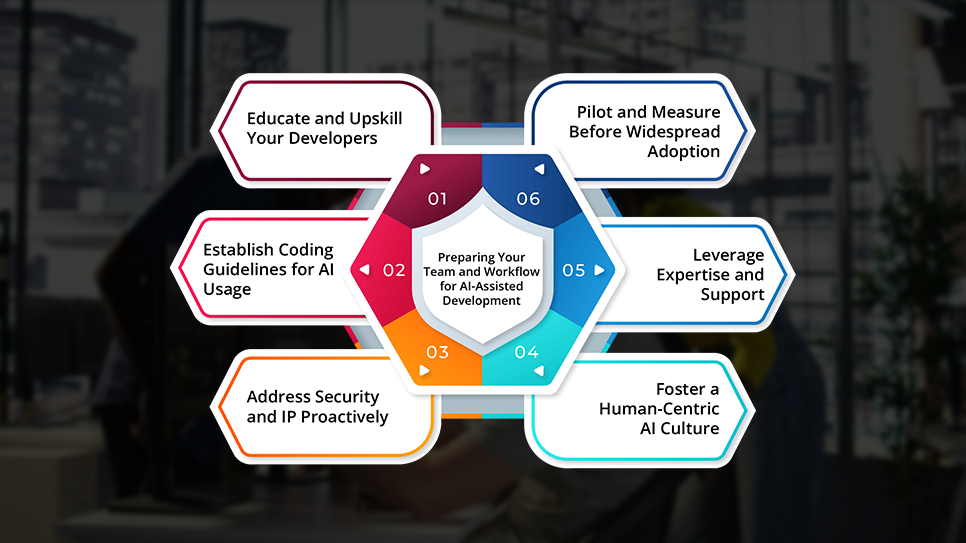
Adopting an AI coding assistant for enterprise teams is not just a technical installation. It changes how your development team works, and readiness decides how much value you get. Here are the practices that matter as you bring AI into your software development life cycle:
1. Educate and Upskill Your Developers
Developers need to learn how to work with the assistant, from writing clear prompts to knowing when to reject a suggestion. Prompt writing is becoming a core engineering skill, a shift covered in our post on how AI is changing software development.
2. Establish Coding Guidelines for AI Usage
Update your development guidelines to cover AI-generated code. For example, you might set a rule that all AI-suggested code must be reviewed via normal code review processes (no blind copy-pasting into production). Developers should document when they used an AI for significant code blocks, so that later maintainers are aware.
3. Address Security and IP Proactively
Work with your security and legal teams when rolling out the AI tool. Verify what data the tool might send out, and configure it to match your policies. If you rely on IP indemnity, switch on any setting it requires, such as GitHub’s public-code filter.
4. Foster a Human-Centric AI Culture
Prepare the cultural side too. Assure your developers that the goal of these enterprise AI tools is to augment their work, not replace them. Show how it removes drudge work, such as boilerplate code and repetitive tests, so they can focus on more complex work.
5. Leverage Expertise and Support
If your team lacks experience with AI tooling, bring in outside help for the pilot design and the rollout plan. Our guide on how to hire LLM developers without overpaying explains what to look for.
6. Pilot and Measure Before Widespread Adoption
It’s wise to start with a pilot project or a subset of the team. Pick a sprint where the assistant could make a measurable impact, such as a module heavy on boilerplate. Track cycle time, review findings and developer feedback before and after.
By taking these steps, your organization will be ready to get the most out of AI coding assistants. Preparation lets you capture the productivity gains, such as faster coding and fewer mundane tasks. It also limits risks like security incidents and developer resistance.
Also Read: AI Powered QA: How Automation Testing Is Transforming Software Quality
Conclusion: Ready to Scale with Enterprise AI Coding Assistants? Fx31 Labs Can Help
AI coding assistants are no longer experimental. They are fast becoming standard in modern software development. But using an AI coding assistant for enterprise work takes more than switching on a plugin. It takes secure deployment, smart integration and a team that aligns AI with real business goals.
That’s where Fx31 Labs comes in.
We help growing teams and enterprises choose, roll out and extend AI coding tools, from Copilot to self-hosted assistants. We build internal coding assistants and integrate secure AI workflows across your software development life cycle. Our India-based engineering teams work with a US office in New Jersey.
Here’s how we support your transition:
- AI coding assistant selection and pilots: We test shortlisted tools on one team against your security, licensing and productivity criteria.
- Code modernization with Coderbotics AI: Coderbotics AI uses 40+ specialized agents across 9+ languages for refactoring, cloud migration and monolith-to-microservices work. It targets large modernization jobs rather than day-to-day code completion.
- Proven refactoring results: In one automated code refactoring project, the platform reached 70%+ precision and cut refactoring time by 30 to 40%.
- Custom AI developer tooling: Tooling tailored to your codebase, security needs and compliance requirements.
- Full-cycle custom software development: From backend logic to frontend interfaces, integrated with AI where it makes sense.
If your developers are ready for AI-powered productivity, but your systems, workflows, or policies aren’t there yet, Fx31 Labs can bridge that gap. Connect with our experts to pilot the right AI coding assistant for enterprise use and build a secure, scalable stack for your team.
Frequently Asked Questions
1. What is an AI coding assistant for enterprise?
An AI coding assistant for enterprise is a coding tool sold on a business plan with controls personal plans lack. Those controls include no-training terms, IP indemnity, single sign-on, admin policies and, for some tools, private deployment.
2. What is the primary focus of AI coding assistants like GitHub Copilot?
Their primary focus is developer speed inside the editor. They suggest code as you type, answer questions in chat and handle multi-step tasks as agents. Business plans add the governance an AI coding assistant for enterprise use needs.
3. What are the best alternatives to coding copilots for enterprise AI development?
The main alternatives are Amazon Q Developer, Gemini Code Assist, Tabnine and self-hosted Tabby. Cursor and Claude Code suit teams that want agent-style tools. The best AI coding assistant for enterprise teams depends on your cloud, your data rules and your IDEs.
4. What enterprise licensing options exist for AI-powered coding assistants?
Most are per user, per month. List prices include $19 for GitHub Copilot Business, $39 for Copilot Enterprise and $19 for Amazon Q Developer Pro. Gemini Code Assist lists $19 Standard and $45 Enterprise on annual terms.
5. Which AI coding tools work for teams rather than individuals?
Any AI coding assistant for enterprise teams should offer central billing, SSO, policy controls and usage reports. GitHub Copilot Business and Enterprise, Amazon Q Developer Pro, Gemini Code Assist and Tabnine Enterprise all offer team administration.
6. What makes AI coding tools secure for enterprise use?
Secure AI coding tools for enterprise use put no-training and retention terms in writing and connect to your identity provider. They also offer deployment options that match your data rules, plus admin controls over models and content.
7. Do enterprise AI coding assistants train on your code?
Not on business plans from the major vendors. GitHub says it does not use Copilot Business or Enterprise data for training. AWS excludes Q Developer Pro content from service improvement, and Tabnine says it never trains on your code.
8. Can you run an AI coding assistant on-premises or air-gapped?
Yes, if you choose the right AI coding assistant for enterprise use. Tabnine Enterprise offers VPC, on-premises and fully air-gapped private installations, and open-source Tabby is built for self-hosting. GitHub Copilot, Amazon Q Developer and Gemini Code Assist run as managed cloud services.