
Custom Enterprise Software Development: A Guide to Bespoke Solutions for Modern Businesses
Enterprise software is not just an application sitting on top of a business. It becomes part of the operating model. That is why custom enterprise software development is rarely a simple build-versus-buy decision. It is a choice about how your company works, where the data lives, how quickly teams can change, and how much control you need over the future.
The “world before” custom platforms are familiar to most CIOs and VPs of Digital Transformation: workflows split across ERP, CRM, service desks, spreadsheets, email, warehouses, and niche tools; duplicate records; manual reconciliation; legacy systems that slow change; and packaged products that fit only after layers of workarounds. A tool may be fast to buy, but if it forces the business into constant adaptation, the hidden cost shows up everywhere else.
That is the real question behind custom enterprise software: when does a bespoke platform create more value than a packaged product, and how do you avoid creating a costly new dependency in the process?
What Custom Enterprise Software Really Means
Enterprise software is software used by organizations to run and optimize core business functions. It includes systems such as ERP, CRM, HR, supply chain, analytics, workflow automation, and industry-specific operational platforms.
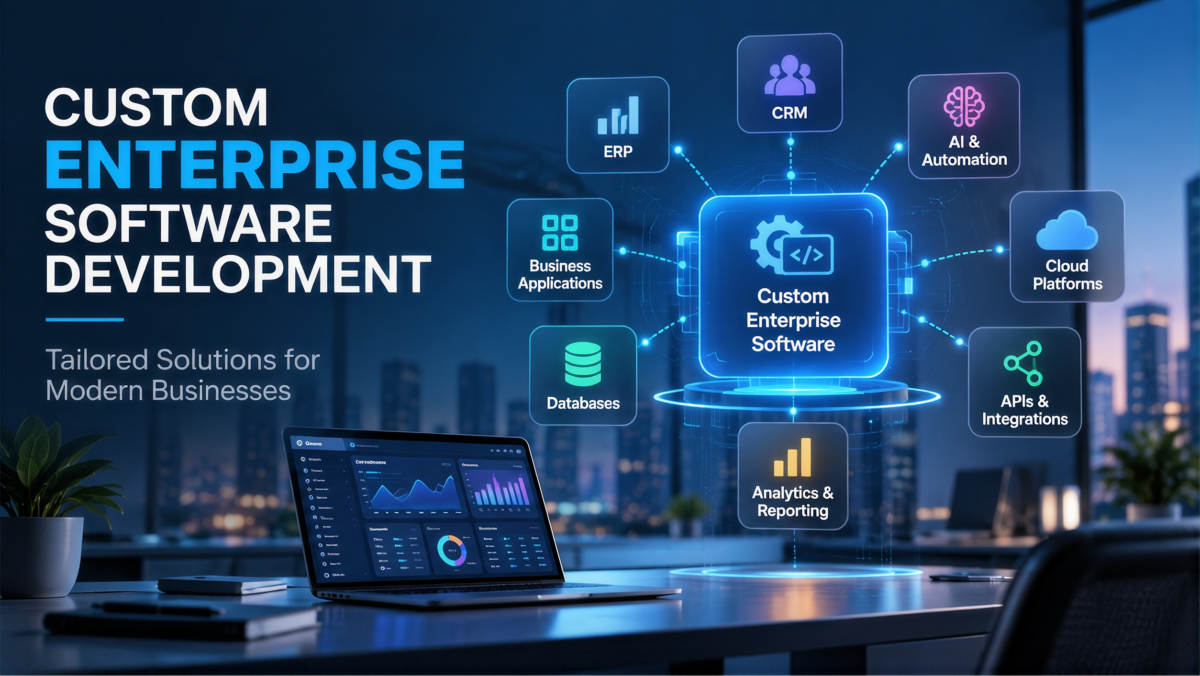
Custom enterprise software is built for one organization, around its processes, data, controls, and operating model. It is more than a tailored interface. In practice, it can include:
- The domain model
- Workflow logic
- Data model
- Integration layer
- Identity and access controls
- Reporting
- Admin tools
- Web and mobile channels
- AI capabilities
- Deployment and operating model
A useful analogy: off-the-shelf software is like a standard building assembled from available modules. Bespoke software is an engineered facility designed around your actual flows, safety needs, expansion plans, and neighboring systems. Neither is always right. The right choice depends on how strategic the workflow is.
When Custom Beats Buy
The strongest case for enterprise software development is not preference. It is business fit.
Strong signals for custom
Choose custom when several of these are true:
- The process affects revenue, margin, safety, or customer experience.
- No product supports the workflow without harmful compromises.
- Deep integration with legacy, operational, partner, or proprietary data is required.
- Data residency, access control, auditability, or policy requirements exceed standard product options.
- The business needs a release cadence or roadmap suppliers cannot provide.
- The organization expects scale, geographic expansion, or new business models.
- Manual workarounds and integration costs are already measurable.
- The enterprise can fund product ownership, security, operations, and continuous improvement.
Strong signals for buying
Buy when the capability is commodity, the process is stable, a mature product fits well enough, and speed matters more than differentiation. In those cases, SaaS can be the better decision because the supplier carries more of the maintenance burden.
Hybrid is often the smartest path.
Many teams do not need an all-build or all-buy strategy. A hybrid model can keep differentiating or sensitive capabilities in-house while using packaged tools for commodity functions like identity, collaboration, payments, or CRM.
That is usually the more mature answer.
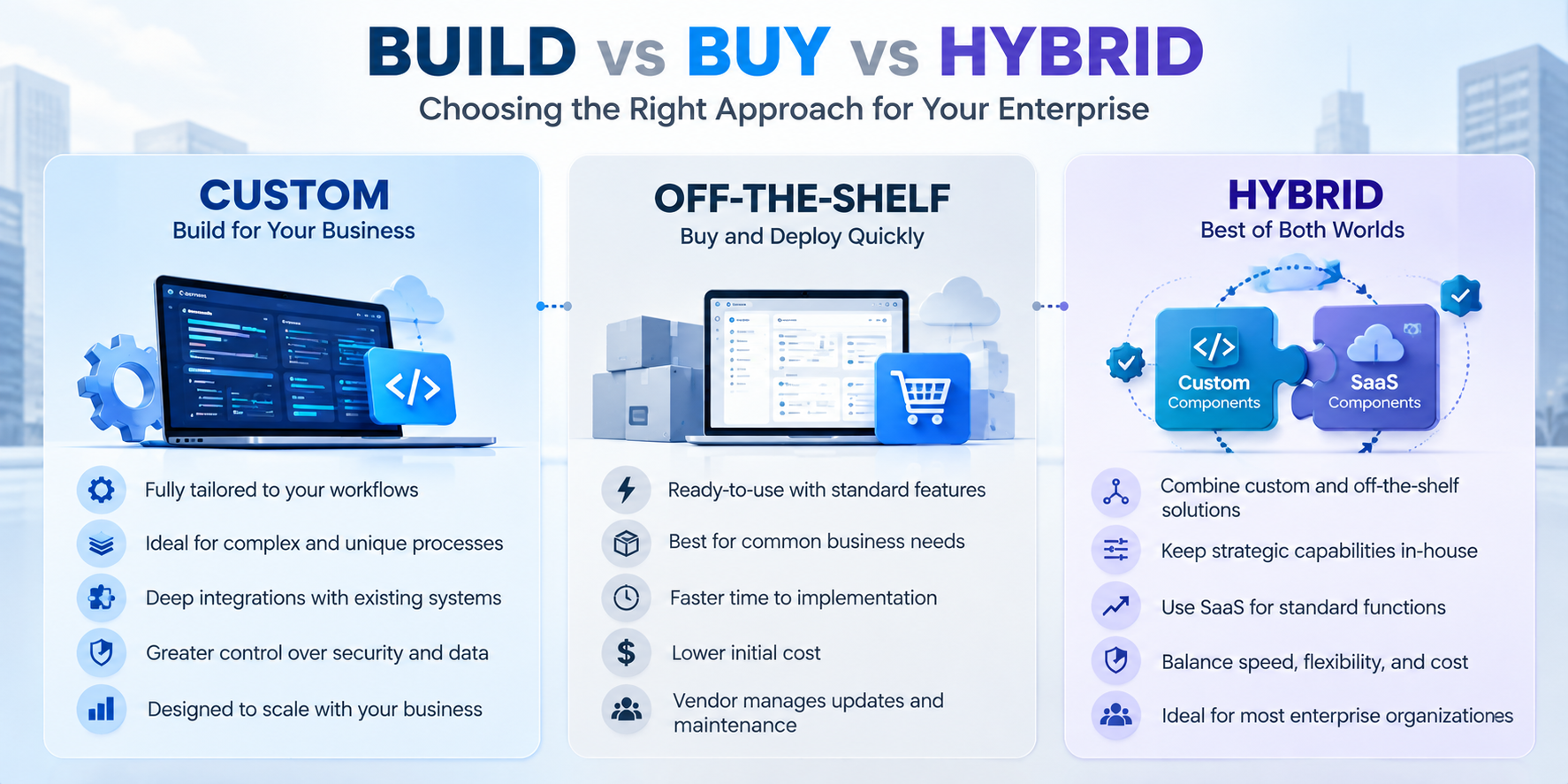
Custom vs Off-the-Shelf
Decision dimension | Custom enterprise software | Off-the-shelf/SaaS | Executive implication |
|---|---|---|---|
Business fit | Designed around your workflows and domain rules | Uses a common product model; configuration may still need workarounds | Choose custom when mismatch affects strategic outcomes. |
Time to first use | Slower because discovery, design, build, testing, migration, and rollout are needed | Faster because the product already exists | Buy when speed matters more than differentiation. |
Upfront cost | Higher discovery and engineering investment | Lower entry cost is common. | Compare lifecycle economics, not just year one. |
Ongoing cost | Internal or vendor engineering, infrastructure, support, upgrades, security, enhancements | Subscription, seats, usage, implementation, and vendor price changes | Model both over the same horizon. |
Differentiation | Can encode unique processes and decision logic | Shared capabilities are available to many customers. | Custom is stronger for true competitive advantage. |
Control | Greater control over the roadmap, data flows, architecture, and release timing | The supplier controls the roadmap and policies. | Control matters for regulated or unique workloads. |
Integration | Built into the design, though still effortful | Connectors can help, but edge cases may need custom work. | Check APIs, events, latency, ownership, and reconciliation early. |
Vendor dependency | Dependency shifts to the development partner, cloud, and internal capability. | Strong dependency on the vendor roadmap and terms | Custom changes lock in; it does not remove it. |
Maintenance | The owner funds product evolution and support. | The supplier maintains the core product, while the customer still handles adoption and integrations. | Assign ownership clearly. |
Scalability | Designed for expected demand and growth | Constrained by product architecture and plan limits | Validate workload and data assumptions. |
Best fit | Differentiated, complex, integration-heavy, regulated, or poorly served workflows | Commodity capabilities with mature products | A hybrid portfolio is often rational. |
Business Value and ROI
If you want custom enterprise software solutions for businesses to hold up under executive scrutiny, the case needs to be built on outcomes, not on “modernization” as a slogan.
Value categories that matter
Look for impact in areas such as
- Faster time from idea approval to usable capability
- Less manual processing, rework, and reconciliation
- Lower cost to serve
- Higher transaction or case-handling capacity
- Better conversion, retention, service quality, or employee experience
- Reduced legacy licensing, infrastructure, or support burden
- Lower exposure to outages, vulnerabilities, and compliance findings
- Faster experimentation and safer rollout of new products
- Better data quality and decision speed
- Reusable platform capabilities across business units
What to measure
A practical baseline-and-target scorecard should track:
- Cycle time, throughput, backlog age, and time-to-market
- Active adoption and task completion by user group
- Cost per transaction, case, order, claim, or customer interaction
- Manual touches, error rate, exception rate, and rework
- Availability, latency, throughput, recovery time, and data freshness
- Change lead time, deployment frequency, failed-deployment recovery time, change-fail rate, and deployment rework rate
- Security findings, remediation time, privileged-access exceptions, and audit evidence completeness
- Revenue, margin, retention, conversion, or risk measures tied to the process
There is no honest universal promise that custom software is cheaper, faster, safer, or more scalable. Those outcomes depend on architecture, governance, engineering quality, and adoption.
Use benchmarks carefully.
Research on technology maturity suggests a directional point worth remembering: better technology maturity tends to correlate with stronger business results. It also suggests there may be meaningful IT productivity upside in many enterprises. But those are associations, not guarantees for a particular program. Treat them as a reason to measure rigorously, not as proof that a custom build will pay off by default.
How the Delivery Process Should Work
Good enterprise software development is staged but not rigid. The point is to reduce risk early and keep learning once the build starts.
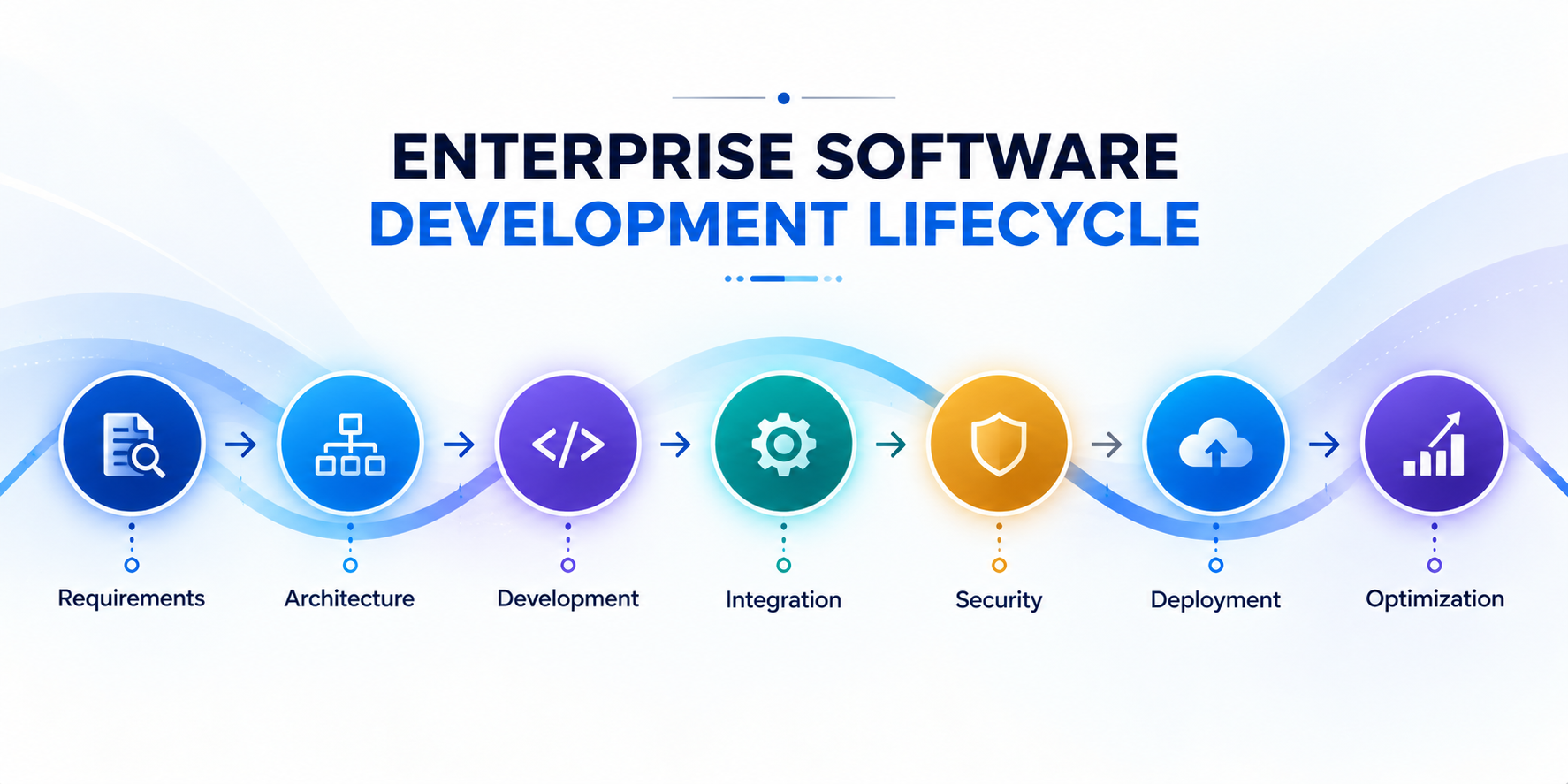
1. Plan the outcome and constraints.
Define:
- The business problem
- The executive owner
- Users and target process
- Baseline metrics
- Desired outcomes
- Budget envelope
- Risk appetite
- Regulatory constraints
- Dependencies
- Decision rights
- What is out of scope
The right output here is a measurable problem statement, not a feature wish list.
2. Analyze users, workflow, data, and ecosystem
Map current and target workflows. Inventory systems, APIs, data stores, identity providers, reports, manual workarounds, and vendors. Identify data ownership, retention, residency, classification, quality, lineage, and migration constraints.
3. Design the product and architecture
Design:
- Domain boundaries
- User journeys
- Interfaces
- Data model
- Integrations
- Deployment topology
- Security controls
- Observability
- Backup and recovery
- Operating model
Start with a proof of concept for the highest-risk assumption. That might be a legacy integration, data migration, model quality, or peak-load behavior.
One caution: do not default to microservices. Use the simplest architecture that can meet the real requirements. A modular monolith is often a better starting point than a distributed system nobody can operate well.
4. Deliver in thin vertical increments.
Build the thinnest end-to-end slice that proves business value and technical viability. Define acceptance criteria, test data, security requirements, and operational readiness before work enters a sprint.
5. Build security and quality from the start.
Security cannot be a final gate. It has to live in the delivery process.
That means:
- Code review
- Dependency and secret scanning
- Static and dynamic analysis
- Infrastructure-as-code review
- Threat modeling
- Penetration testing
- Access-control tests
- Data-protection tests
- Evidence capture
Testing should cover unit, integration, system, acceptance, usability, performance, resilience, migration, rollback, and recovery. Test the application in the broader environment, not in isolation.
6. Release progressively
Use environments and automated pipelines to promote changes. Where risk warrants it, use pilots, beta releases, feature flags, phased rollout, rollback criteria, training, support readiness, and a clear incident process.
7. Operate, learn, and evolve
Maintenance is not just bug fixes. It also includes optimization, new use cases, patching, unplanned changes, and testing patches.
Ownership should be explicit across product, operations, security response, data quality, vendor management, and budget. Treat production telemetry and user feedback as roadmap inputs.
Scalability, Reliability, and Architecture
Cloud-native architecture is not the same thing as “put it in the cloud.” The real design goals are controlled change, elasticity, resilience, security, visibility, and cost transparency.
Useful patterns include:
- Stateless services where persistent local state is not required
- Autoscaling with explicit minimum and maximum limits
- Load balancing across healthy capacity
- Loosely coupled services to reduce dependency chains
- Circuit breakers, retries with limits, graceful degradation, and backoff
- Database architecture choices aligned to required availability, consistency, recovery, and scale
- Metrics, logs, traces, dashboards, and runbooks as core product features
- Failure-injection and recovery testing
Define reliability in user terms. Availability, latency, throughput, correctness, freshness, and successful transaction completion matter more than abstract claims of “information system resilience.”
For review, it is useful to think in terms of operational excellence, security, reliability, performance efficiency, cost optimization, and sustainability. That structure helps, but it does not replace workload-specific judgment.
Integration and Data Architecture
Most enterprise problems are really integration and data problems wearing a software label.
Start with business events and ownership, not with a tooling decision.
Integration design checklist
- Identify the system of record for each critical entity
- Define API contracts, versioning, auth, authorization, rate limits, schemas, error formats, and ownership
- Decide where synchronous APIs fit and where asynchronous messaging or events fit better
- Define orchestration, compensating actions, timeouts, retries, dead-letter handling, and reconciliation
- Specify idempotency and duplicate-event behavior
- Establish data validation, mapping, lineage, retention, quality monitoring, and privacy controls
- Protect secrets and log access without exposing payloads
- Test backward compatibility, degraded dependencies, replay, recovery, and migration
Enterprise integrations should define API ownership, authentication, error handling, data validation, monitoring, and recovery procedures. For complex environments, teams may also need event-driven messaging, idempotency controls, retry policies, and reconciliation mechanisms.
Security, Compliance, and Governance
Security should be contractual and architectural.
A solid delivery baseline includes:
- Preparing people, process, and technology
- Protecting software components against tampering
- Producing well-secured software
- Responding to vulnerabilities and preventing recurrence
For web applications, security requirements should be explicit enough to support testing and contract enforcement. Identity, least privilege, secrets handling, encryption, logging, retention, and data residency all need to be addressed early.
The practical question to ask any development partner is simple: who owns the code, the repositories, the cloud accounts, the data, the documentation, and the deployment credentials?
Also ask:
- What security requirements and threat model are included?
- What testing evidence is provided?
- How are vulnerabilities handled?
- What is the incident notification process?
- How are backup, restore, disaster recovery, and exit handled?
- Which compliance certifications are relevant to this project, and which controls are actually in scope?
A certification badge is not proof that the application you are buying is compliant.
Cost and Total Cost of Ownership
There is no defensible universal price for custom enterprise software. Scope, integrations, migration, team composition, geography, compliance, quality requirements, and operating scale all matter.
So compare total cost of ownership, not just build cost.
For build, include:
- Discovery, architecture, design, engineering, testing, security, release, and migration
- Product and program management
- Cloud compute, storage, network, observability, backups, disaster recovery, and environments
- Third-party components, APIs, model inference, and data tools
- Integration adapters, cleansing, reconciliation, and parallel-run costs
- Security testing, audits, incident response, patching, and remediation
- Support, on-call, training, documentation, and service management
- Enhancements, upgrades, technical debt reduction, and eventual replacement
- Business disruption, adoption effort, downtime, and delay
For buy, include:
- Subscription or license
- Implementation and configuration
- Connectors and migration
- Support tiers
- Usage growth
- Custom extensions
- Contract escalators
- Renewal risk
- Exit and migration
A low-cost build that cannot be operated securely is not low TCO. A low-price SaaS product that forces heavy workarounds and integrations is not low TCO either.
Practical Examples
Legacy e-commerce modernization
A slow commerce platform constrains conversion and growth. A custom approach can rebuild the responsive experience, modernize the backend and data access, improve database performance, integrate inventory, payments, fulfillment, analytics, identity, and customer support, and migrate traffic gradually.
What to measure:
- Page and checkout latency
- Conversion
- Abandonment
- Order throughput
- Incident rate
- Release lead time
- Cost per order
- Internal documentation and knowledge workflow
Employees often waste time searching fragmented repositories and assembling reports manually. A custom solution can connect authorized internal sources, enforce identity-aware retrieval, generate summaries or reports, preserve traceability, route exceptions to humans, and log model and data behavior.
What to measure:
- Time saved
- Answer acceptance
- Escalation rate
- Factual-error rate
- Search success
- Adoption
- Sensitive-data incidents
- CRM and operational workflow integration
Sales, support, and operations often work from inconsistent records and hand off cases manually. A custom platform can define the customer system of record, synchronize selected data through APIs and events, orchestrate routing, expose role-specific views, and reconcile failures.
What to measure:
- First-response time
- Resolution time
- Duplicate records
- Handoff time
- Data freshness
- Customer satisfaction
Team augmentation for a new product
Sometimes the issue is not the product itself. It is capacity. If internal teams lack mobile, QA, cloud, or AI expertise, a dedicated team can help fill the gap, provided product ownership and architecture are still clearly assigned.
That is where Fx31 Labs’s stated services fit in: custom mobile and web application development, generative AI and machine learning services, rapid prototyping, and AI-enabled talent augmentation. The point is not that extra hands solve strategy. They do not. The point is that specialized delivery capacity can help if the operating model is already clear.
How to Evaluate a Development Partner
When you’re buying custom enterprise software development, don’t just treat it like a standard vendor purchase. Judge the partner exactly like you would a major operating decision, because if a core build goes sideways, you’re the one dealing with the fallout.
- Define what success actually looks like before you even start writing the RFP.
- Ask for relevant, hard-won experience instead of settling for a generic portfolio of best-case scenarios.
- Interview the specific engineers and leads who will actually deliver the work, not just the polished sales team.
- Request a discovery plan that actively validates your assumptions and hunts down hidden project risks.
- Review their daily engineering discipline. Look for real rigor around CI/CD, testing, observability, incident response, threat modeling, and documentation.
- Run reference checks that focus on the painful stuff. Ask how the team handled scope changes, stubborn defects, unexpected staffing shifts, and midnight production incidents.
- Demand commercial transparency upfront. Nail down their baseline assumptions, change control processes, delivery milestones, ongoing support, and expected cloud costs.
- Protect your intellectual property and lock down clear exit rights in the master contract.
- Limit your initial exposure by starting with a tightly bounded discovery phase or a focused pilot project.
- Score every proposal consistently. Evaluate them objectively on business understanding, architecture, security, system integration, actual delivery evidence, team quality, operating model, commercial clarity, communication habits, and exit risk.
Key Takeaways
- Custom software makes sense when standard products create strategic limitations.
- Build vs buy should be evaluated using total cost of ownership, not initial price.
- Integration, security, data ownership, and operational capability should be assessed before development.
- Hybrid approaches often provide the best balance between customization and speed.
- Success should be measured using business outcomes, not just delivery milestones.
FAQ
Is custom enterprise software better than SaaS?
Not always. Custom is better when differentiation, workflow fit, integration, control, or regulation justify owning the full lifecycle. SaaS is better for commodity capabilities where speed and standardization matter more.
How long does custom enterprise software take?
There is no responsible universal timeline. Scope, integrations, migration, compliance, team capacity, and rollout strategy all affect duration. Start with discovery and milestones, not a fixed promise.
Is custom software more expensive?
It can require more upfront investment, but the real comparison is total cost of ownership. Include implementation, integration, support, upgrades, adoption, and exit, not just initial build or subscription cost.
Should an enterprise build everything from scratch?
Usually not. Build selectively for strategic or poorly served capabilities and buy commodity functions when the fit is good. Hybrid architectures are often the most practical.
How do we keep a custom platform secure?
Make security part of the architecture and contract. Threat model early, apply secure development practices, use least privilege, protect secrets and data, test dependencies and APIs, monitor production, and define incident and recovery responsibilities.
How should a CIO judge whether the project is working?
Baseline business and technical metrics before delivery. Then track adoption, cycle time, cost per transaction, error and rework, availability, latency, recovery, security remediation, and delivery performance in context.
What should we ask a development partner first?
Ask how they will understand the business outcome, surface risk, define non-functional requirements, secure the system, measure value, transfer knowledge, operate the product, and support exit.
How much does custom enterprise software development cost?
There is no universal price for a custom build. Costs depend heavily on your scope, integration complexity, compliance, and scale. Always evaluate the Total Cost of Ownership (TCO)—including upfront engineering and ongoing infrastructure, security, and support. A low-cost build that forces heavy workarounds will ultimately cost you more.
Conclusion
Custom software is not just a coding choice. It is an operating-model decision.
Organizations that get the most value from custom software usually know where standardization is sufficient, where differentiation matters, and how to govern both. without drifting into chaos. They fund security, operations, adoption, and evolution alongside the build. They measure outcomes instead of activity. And they treat ownership as part of the product, not an afterthought.
That is why custom enterprise software solutions for businesses can create real advantage when the problem is strategic, the architecture is disciplined, and the partner model leaves the enterprise stronger than it started.