
Database Architecture for Apps: Scalable Solutions & Best Practices
A high-performance application still relies on its database architecture, which is effective as a building block. When an application’s data storage, structure, and access are defined, it is a direct way of saying that speed, reliability, and scalability are affected. The right choice of database architecture ensures that the developers get a good user experience and that database management is done efficiently according to the growth of the app. The current trend in app database design is such that it is characterized by a clean structure, performance maximization, and adaptability to changing data needs.
To illustrate, application of scalable database techniques (e.g., replication and partitioning) and adherence to modern storage methods (e.g., regular backups and encryption) guarantee reliability even during peak usage. To quote one source, modern development practices put an emphasis on writing clean code, on providing good documentation, and on building scalable architectures.
In this post, we explore how to manage app data effectively by architecting databases that meet performance and growth demands.
Why Database Architecture Matters in App Development
Every app’s effectiveness depends on how well it handles data. The database architecture – including the choice of database type and schema design – forms the backbone of data operations. A robust architecture means faster responses to user actions (reads and writes), higher availability, and simpler scaling. Poor design, on the other hand, can lead to slow queries, data bottlenecks, and costly rework. For instance, applications built on relational databases must normalize data and index key fields to maintain speed; without these measures, performance can degrade quickly.
Good design is also user-centric. It considers how users interact with data. By aligning data models with actual usage patterns, developers can optimize queries and simplify application logic. In practice, this means mapping out clear data requirements before development. As one expert explains, beginning with clear requirements and realistic timelines is critical in app database design and management. This planning ensures that the architecture can accommodate new features and avoid major redesigns later.
Key Points:
- Database architecture directly affects app performance and scalability.
- Early planning and clear data models prevent costly redesigns.
- A good design balances normalization (for data consistency) with denormalization (for faster reads), based on the app’s needs.
Principles of App Database Design
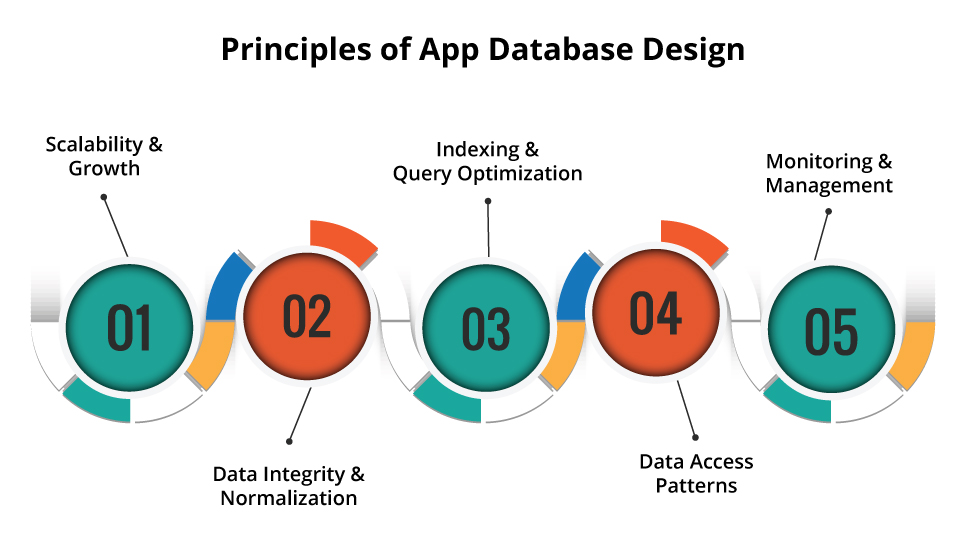
App database designing is first and foremost a data understanding process. The first step is to group your data according to types (e.g., user profiles, transactions, logs) that will help in schema selection. Structured data (such as customer records) usually works well with a relational table, while unstructured data (like media files or logs) might live in NoSQL or object storage. Among the key design factors are:
- Scalability & Growth: from the beginning on plan for horizontal scaling. When you expect heavy traffic, choose databases that can be sharded or have distributed storage.
- Data Integrity & Normalization: If you are working with relational schemas, normalize the data to eliminate duplication. For NoSQL systems, denormalize selectively to enhance read performance.
- Indexing & Query Optimization: Point out frequent queries and create an index for the fields they use to accelerate lookups.
- Data Access Patterns: Design your schema around how the app uses data. Analyze typical transactions and optimize the schema to support them efficiently.
- Monitoring & Management: Plan for performance monitoring and maintenance (e.g. archiving old data) as part of your architecture.
Successful app database design is an ongoing process. As noted in the App Database Design and Management guide, modern development practices emphasize performance optimization, thorough documentation, and adaptability. In other words, build flexibility into your schema so it can evolve. A clear documentation and change management process ensures that, as requirements change, the database schema can adjust without breaking the app.
Scalable Database Solutions for Apps
As apps grow, scalable database solutions become vital. Two main approaches are commonly used:
Replicated architectures (leader-follower) designate one database node as the leader (handling all writes) and one or more followers (handling reads). The leader maintains write-ahead logs, and followers update themselves from those logs. This offloads read traffic from the leader, improving read throughput. However, write operations still go through the leader, which can be a bottleneck if the write volume is very high.
Partitioning (Sharding) divides the database so that different servers handle different subsets of data. For example, you might partition user data by region or user ID range. Each shard is a separate database instance, so both reads and writes scale horizontally. Partitioning spreads the load and storage across machines, but it adds complexity in the application (which must route queries to the correct shard). Despite this complexity, sharding is key for handling large-scale growth when replication alone isn’t enough.
Modern NoSQL and NewSQL databases offer built-in scalability. NoSQL systems like MongoDB or Cassandra are designed for distributed environments and favor availability over strict consistency. This makes them highly scalable – for instance, Amazon DynamoDB automatically partitions and replicates data across nodes to handle massive workloads. However, NoSQL designs often require careful planning of partition keys and indexes. Some NoSQL databases sacrifice complex joins for simple key-value or document operations, trading off certain features for speed and scale.
Many teams now leverage managed database services to simplify scaling. Database-as-a-Service (DBaaS) offerings from cloud providers automatically handle replication, backups, and scaling under the hood. Using a DBaaS significantly reduces administrative overhead, since the provider takes care of routine tasks. In practice, this means your developers can focus on application features rather than low-level maintenance.
Cloud Database Architecture and Best Practices
Cloud-native databases are revolutionizing how we design database architecture. The cloud offers elastic resources on demand, allowing apps to scale seamlessly. Many modern architectures are multi-cloud, meaning they deploy data across multiple cloud providers. TechTarget reports that multi-cloud adoption “is becoming a key component of modern database architecture”. In practice, an app might use AWS for some data and Azure for other data to leverage the strengths of each platform.
This multi-cloud approach provides benefits like cost savings, flexibility, and avoiding vendor lock-in. For example, one cloud may offer lower storage costs or specialized services, so distributing your data can optimize both price and performance. It also improves resilience: if one provider has an outage, parts of your data may still be accessible in another cloud.
In the cloud, using managed database services is a best practice. Cloud providers offer DBaaS (e.g., Amazon RDS, Azure SQL Database, Google Cloud Spanner) that handle much of the heavy lifting. These services manage replication, patching, and backups automatically, dramatically cutting down on operational work. As a result, your team spends less time on routine database administration and more time delivering features.
Security is also integral. Cloud databases typically include encryption at rest and in transit, fine-grained access controls, and audit logging. Still, you should architect carefully: for sensitive data, you might use a private cloud or virtual private network, while leveraging public-cloud DBaaS for less-sensitive workloads. Fx31 Labs recommends matching each database to the optimal environment based on factors like cost, control, and latency. Our [Cloud Infrastructure & DevOps] solutions team can help tailor your cloud database architecture to meet your app’s specific needs.
Data Storage Best Practices
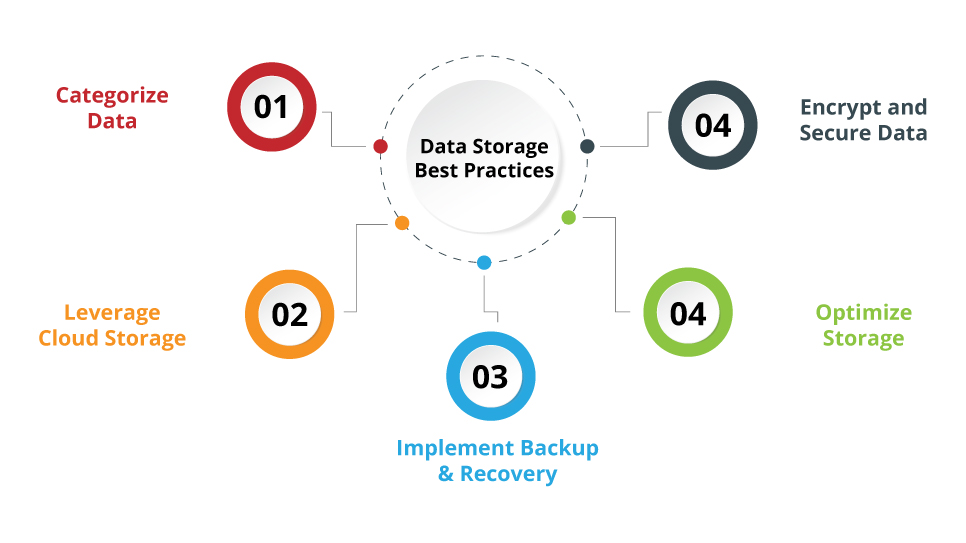
Proper data storage is essential to a robust database architecture. Key best practices include:
- Categorize Data: Understand and classify your data (structured vs. unstructured). This informs your storage strategy. For example, relational tables might store structured records, while object or blob storage could hold images, logs, or backups.
- Leverage Cloud Storage: Use scalable cloud storage services (like Amazon S3, Google Cloud Storage, or Azure Blob Storage) for large datasets and backups. The cloud provides flexibility and pay-as-you-grow pricing as your data volume increases.
- Implement Backup & Recovery: Establish regular backups and a disaster recovery plan. Store backups in a separate location (or even another cloud) and periodically test restores. This ensures you can recover from failures or data corruption.
- Encrypt and Secure Data: Enable encryption for data at rest and in transit to protect sensitive information. Use strict access controls (e.g., IAM roles, network restrictions, multi-factor authentication) to prevent unauthorized access.
- Optimize Storage: Use data tiering and caching where appropriate. Keep frequently accessed data on high-performance (but costlier) storage, and archive or tier off older data to cheaper storage. Implement caching (in-memory or SSD caches) for hot data to speed up frequent queries.
Additionally, incorporate data governance and retention policies. Define how long you keep each type of data and when it should be archived or purged to comply with regulations. Maintain metadata (tags, indexes) to keep your storage organized. By following these storage best practices and security measures, your data will remain safe, compliant, and efficiently accessible.
Conclusion
Designing the database architecture for your app is a strategic process that balances today’s requirements with future growth. A well-architected database improves app responsiveness, ensures data safety, and simplifies scaling. Key takeaways include carefully planning your data model, choosing the right mix of databases (SQL, NoSQL, cloud services), and applying proven strategies for scaling (replication, sharding) and storage (backups, encryption, caching). Leveraging managed cloud database services and following data storage best practices keeps your system agile and secure.
For apps expecting rapid growth, integrating scalable database solutions, such as managed cloud databases and data sharding, is critical for seamless scaling. Similarly, following solid app database design principles (like proper normalization and indexing) from the start reduces complexity later. Consistently applying these data storage best practices, including secure backups, data tiering, and encryption, ensures that data remains safe and accessible as you expand. Ultimately, the right architecture depends on your unique workload and goals.
Engage experts if needed: at Fx31 Labs, our Backend Development and Database Services teams help companies design bespoke database architectures aligned with their business needs. By building on scalable, secure data foundations, your app can perform reliably today and adapt to whatever tomorrow brings.
FAQs
1. What is database architecture?
A. Database architecture refers to the underlying structure and organization of a database system. It includes the database model (relational, NoSQL, etc.), schema design, and deployment strategy. In practice, it defines how data is stored, accessed, and managed. A good database architecture ensures that the app can retrieve and update data efficiently and scale as needed.
2. Why is database architecture important for app development?
A. Because the database lies at the heart of data-driven apps, its architecture directly impacts performance and scalability. A well-designed architecture minimizes slow queries and downtime. It also affects how easily you can add features or handle increased load. For web and mobile apps, fast, reliable data operations (reads and writes) directly improve the user experience. The right architecture helps the app manage growth and change without major rework.
3. What are scalable database solutions for growing apps?
A. Common scalable solutions include replication and partitioning (sharding). Replication (e.g., leader-follower setups) spreads read load across replicas. Partitioning divides data across multiple servers so both reads and writes can scale horizontally. NoSQL databases are inherently scalable for large workloads, often automatically distributing data across many nodes. In cloud environments, managed database services (DBaaS) can also auto-scale resources and handle failover, making scalability easier.
4. Why use cloud database architecture?
A. Cloud database architecture leverages cloud infrastructure for flexibility and resilience. Cloud providers offer managed databases that handle backups, replication, and scaling automatically. Multi-cloud architectures allow you to avoid vendor lock-in and use best-of-breed services; for example, distributing data across AWS, Azure, and Google Cloud can reduce costs and improve performance. With cloud-based solutions, you can quickly scale resources to meet demand and pay only for what you use, which makes your database architecture much more adaptable.
5. What does database management for apps involve?
A. Database management for apps includes all the operational tasks needed to keep the database running smoothly. This means choosing a scalable database system and setting up monitoring, backups, and optimization procedures. As one guide notes, it starts with selecting a database that can grow horizontally with your data. Then you implement regular backups and monitoring tools. Routine maintenance (like indexing, updating schemas, or cleaning up old data) helps keep queries fast and the system healthy. Effective management ensures the app’s data layer remains reliable as usage grows.