
Build vs Buy AI Agents: What Enterprise Teams Should Decide First
If you are a CIO, CTO, enterprise architect, or operations leader, the hardest question is usually not “which model is best?” It is “who gets access to which systems, what they are allowed to do there, and who is accountable when the agent takes a step.” That is why the build-vs-buy decision for AI agents is really an operating-model decision, not a demo comparison.
Think of it less like choosing a chatbot and more like deciding who gets an employee badge. The badge opens certain doors, but it also defines the rules of entry, the scope of work, and the review process. In the same way, a useful agent has to fit into CRM, ERP, ticketing, and document systems that already hold the organization’s context. If you connect a language model to more systems without sorting out permissions, workflow ownership, evaluation, and accountability, you do not just improve productivity. You can widen the blast radius of mistakes.
Build vs Buy AI Agents is not simply a question of which AI model or platform to choose. If you are a CIO, CTO, enterprise architect, or operations leader, the harder question is who gets access to which systems, what they are allowed to do, and who is accountable when the agent takes a step. The decision is really an operating-model decision, not a demo comparison.
Key Takeaways
- Buy when the workflow is common and existing controls are sufficient.
- Adapt when an accelerator covers most of the workflow but requires customization.
- Build when proprietary logic, integrations, data boundaries, or action control are strategically important.
- Combine when commodity infrastructure can be purchased while differentiated workflow intelligence is owned.
- Evaluate agents using workflow outcomes, security, lifecycle cost, and governance, not demo quality alone.
The world before agents: fragmented work, not missing intelligence
Most enterprise teams do not lack models. They lack clean handoffs.
Work sits across systems. Context is split between documents, tickets, customer records, and approvals. People repeat the same steps to gather information, summarize it, and move it from one place to another. Pilots may look productive, but the gains often stay local because nobody has measured the whole process.
That matters because an agent is not just a smarter interface. It is an application that pursues a bounded task, retrieves relevant knowledge, selects approved tools, and may take actions through workflows or APIs. Once it can act, the real questions become:
- What data can it see?
- What can it write back?
- Who reviews the result?
- What happens when the output is wrong?
- What happens when the source data is stale or contradictory?
Those are architectural and governance questions first, and product questions second.
What an AI agent is and what it is not
For this decision, it helps to separate the terms.
An AI agent is an application that works toward a bounded task using instructions and context, retrieves relevant knowledge, selects or invokes approved tools, and may take actions through workflows or APIs. It can be read-only, draft-and-review, or action-capable. Not every agent is fully autonomous.
A copilot is a user-facing assistant embedded in an existing work environment. It helps a person ask questions, draft, summarize, or initiate tasks. A copilot may expose agents, and an agent may operate through a copilot interface or independently.
An off-the-shelf copilot is a packaged experience where the interface, orchestration, administration, and typical integrations are largely supplied by a platform. Buyers still configure access, knowledge, policies, and adoption.
A licensed accelerator sits in the middle. It is a reusable starting point, such as templates, orchestration, connectors, or evaluation scaffolding, that still needs adaptation. The important detail is not the label. It is what rights you actually get: source code, deployment, configuration, support, or some mix of those.
A custom-built agent means the enterprise or its partner owns significant application-specific orchestration, integrations, policy enforcement, evaluation, and user experience. That does not mean training a foundation model from scratch.
And then there is hybrid: buy commoditized model access, infrastructure, identity integration, or the copilot interface while building the workflow logic, retrieval, tools, controls, and evaluation that actually matter.
That is the architectural map behind custom AI development vs off-the-shelf AI tools. The interface is only one layer.
Comparison: custom-built agent, licensed accelerator, or off-the-shelf copilot?
| Criterion | Custom-built agent | Licensed accelerator | Off-the-shelf copilot |
|---|---|---|---|
| Control | Greatest potential control over orchestration, tool boundaries, interface, and release cycle if the team engineers operate those controls | Depends on editable components, license rights, deployment model, and access to code and configuration | Fast access to supplied capabilities, but the platform determines many interfaces, limits, and release decisions. |
| Security and governance | Can implement use-case-specific identity, approvals, isolation, and audit, but the enterprise owns much of the engineering and assurance burden. | Inherits provider controls and provider dependencies; inspect code, permissions, logging, and support responsibilities | May benefit from established administrative controls, but configuration, source-data permissions, and usage policy remain enterprise responsibilities. |
| Workflow fit | Best for unusual decision rules, cross-system actions, or specialized interfaces | Strong when a repeatable starting point covers most steps and the remaining gaps are configurable or extensible | Good for common knowledge and productivity tasks; specialized process logic may require extensions or a different approach. |
| Integration depth | Can build directly against APIs, legacy systems, and event flows, subject to feasibility and maintenance | Depends on connectors, extension points, source-code rights, and integration effort | Often easiest inside its native ecosystem; cross-platform action, data fidelity, and latency must be validated. |
| Initial speed | Usually slower when identity, integrations, testing, and production operations must be created | Can shorten initial assembly if the components actually fit | Often the quickest for a bounded, already-supported use case |
| Long-term economics | Engineering, hosting, usage, maintenance, testing, security, and opportunity cost, with potential reuse and differentiation | License or service fees plus adaptation, integration, operation, and possible replacement costs | Seats or platform fees plus administration, integration, change management, and possible limits on customization |
These are tendencies, not guarantees. A poorly governed bespoke agent can be weaker than a well-configured purchased one. A tightly integrated accelerator can outperform a generic custom proof of concept. The right question is not which row “wins.” It is which tradeoff matches the workflow.
Decide the workflow before you compare products.
Teams often start by shopping for tools. That is backwards.
Before you compare build vs buy AI agents, define the workflow in operational terms:
- Name the trigger.
- Name the authorized user or event.
- Identify the source systems.
- List the decision points.
- Define allowed outputs and writes.
- Define the exception route.
- Assign one accountable process owner.
That turns a vague request like “deploy an agent for support” into something testable, such as “draft a response from approved knowledge and propose a ticket update for human approval.”
Then classify autonomy and consequence:
- Reading and summarizing
- Drafting and proposing
- Executing changes
Those are not the same. Neither are external messages, payments, sensitive personal data, or irreversible actions. Approval boundaries should be clear before you grant write access.
Then map data and identity:
- Where authoritative information lives
- Who can see it
- Whether source permissions carry through a connector
- How fresh the data must be
- Where prompts, retrieved content, traces, and tool outputs are processed or stored
A connector being available is not proof that its permissions or data semantics fit the deployment.
Build vs Buy AI Agents: What Actually Separates the Options?
The real differentiator is usually not the model. It is the layer above it.
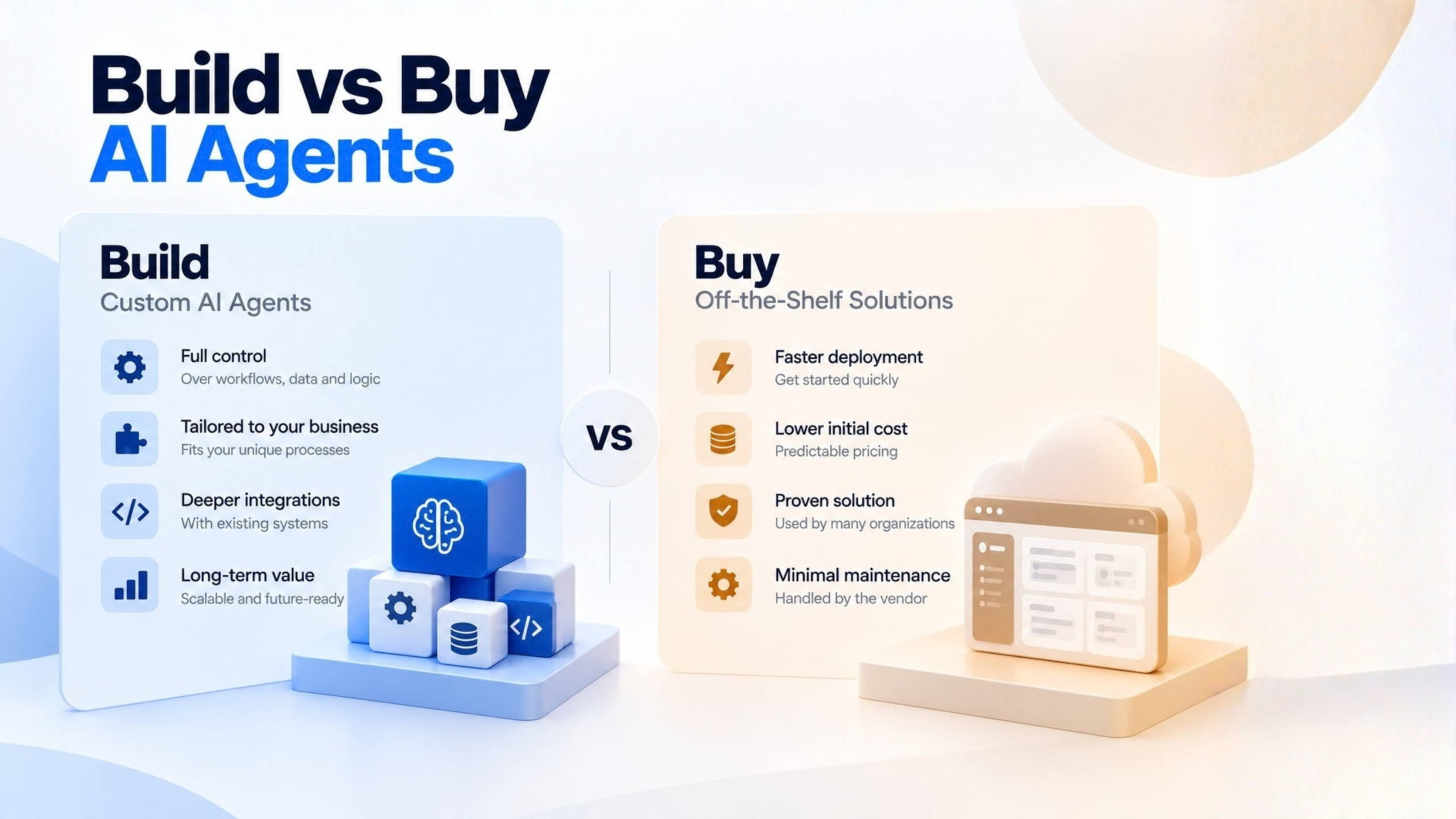
Buy when the task is common, the existing environment is sufficient, controls match the risk level, and time-to-value matters.
Adapt an accelerator when reusable pieces cover meaningful work but a clear workflow or integration gap remains.
Build when proprietary logic, legacy integration, action control, specialized data boundaries, or product differentiation cannot be expressed well enough through configuration.
Combine when the interface or infrastructure is a commodity but the workflow intelligence is not.
That hybrid pattern is often the practical answer for enterprise teams. You can buy the front desk and own the specialist.
Security and architectural checks you should not skip
Security is another major factor when evaluating Build vs Buy AI Agents, particularly when agents can access enterprise systems or take actions.
A production design should separate the user or event trigger, enterprise identity, retrieval and context assembly, model and orchestration layer, narrowly scoped tools, approval gates, and logging or evaluation.
For retrieval, test whether source permissions are preserved and whether stale or conflicting documents are handled cleanly.
For actions, enforce authorization at the application or API boundary. Do not rely on instructions in a prompt to control access.
There is also a real threat model here. An attacker can place instructions in material an agent reads, such as documents, retrieved pages, or tool results, and try to redirect its behavior. This is indirect prompt injection, sometimes described as agent hijacking. The goal may be to exfiltrate data, send phishing messages, or execute code where tools permit it. The OWASP Top 10 for LLM Applications provides a useful security reference for identifying and addressing risks in LLM-powered applications.
That is why controls matter:
- Least-privilege identities and tool scopes
- Read-only access where possible
- Explicit approval for consequential writes or external messages
- Separation of trusted instructions from untrusted retrieved content
- Input and output validation where appropriate
- Protected secrets
- Source-aware access checks
- Audit trails of tool calls and approvals
- Rate and spend limits
- Tests for prompt injection, data leakage, bad tool arguments, and recovery from tool failures
Human approval helps only when the reviewer has enough context and real authority to intervene.
Compare ROI on the workflow, not the demo
A practical Build vs Buy AI Agents analysis should measure the complete workflow rather than the quality of an AI demo.
This is where many agent discussions fall apart. A polished demo is not a business case.
Build a representative test set from actual, authorized work:
- Routine requests
- Ambiguous requests
- Missing or contradictory documents
- Stale records
- Permission boundaries
- Malicious retrieved instructions
- Failed APIs
- Requests that should be refused or escalated
Then measure the workflow end to end:
- Task completion
- Answer grounding
- Correct tool selection and arguments
- Unauthorized or harmful actions
- Escalation quality
- Repeatability across runs
- Latency
- Cost per successful case
Review traces and approval decisions, not just final prose. Retest after prompt, model, connector, tool, or source-data changes.
For ROI, use the workflow, not the hype:
- Annualized benefit = verified staff time actually redeployed or avoided, plus measured rework, cycle-time, service, or revenue improvements where attribution is defensible
- Lifecycle cost = acquisition or licensing + implementation and integration + model or compute usage + data pipelines + security and evaluations + human review + support and maintenance + change management + expected transition costs
- Net benefit = measured benefit minus lifecycle cost
- ROI = net benefit divided by lifecycle cost
Do not count every minute theoretically saved as cash savings. Do not assume avoided hiring unless you have a credible counterfactual. And do not compare the cost of a model call with the cost of a successfully completed, appropriately reviewed task. That is the wrong unit.
Build vs Buy AI Agents: Total Cost of Ownership
The initial price of an AI agent is only one part of the decision. Enterprise buyers should compare total cost of ownership across the full lifecycle, including implementation, integration, security, evaluation, operations, and future changes.
Building typically includes:
- Engineering and product development
- Infrastructure and hosting
- Enterprise integrations
- Security and compliance work
- Evaluation and testing
- Monitoring and maintenance
- Ongoing model and workflow changes
Buying typically includes:
- Licensing or subscription fees
- Usage-based costs
- Implementation and configuration
- Integration work
- Administration and governance
- Customization
- Vendor dependency
- Migration or exit costs
The lower initial cost is not necessarily the lower long-term cost. Compare both approaches against the same workflow, expected usage, security requirements, support needs, and expected lifespan before making a decision.
Vendor Lock-In and Exit Strategy
Vendor dependency is another important consideration in a Build vs Buy AI Agents decision.
Vendor selection should also consider what happens if the organization needs to change platforms later. An AI solution can become difficult to replace when workflows, integrations, data, configurations, or evaluation processes depend heavily on one provider.
Before committing, evaluate:
- Data portability: Can enterprise data and outputs be exported in usable formats?
- Model portability: Can the application work with alternative models if requirements change?
- API dependencies: How much of the workflow depends on proprietary APIs or services?
- Workflow ownership: Who owns the prompts, orchestration logic, tools, evaluations, and configurations?
- Source-code ownership: If custom components are developed, who owns and controls the code?
- Configuration export: Can important settings and policies be migrated?
- Integration dependencies: How difficult would it be to replace connected services?
- Exit planning: What would be required to migrate the solution to another provider?
An exit strategy does not mean expecting the vendor relationship to fail. It means understanding the organization’s options before those options become expensive.
What the market signals, without overreading them
A few survey data points are useful, as long as you keep the denominators intact.
In McKinsey’s 2026 global AI survey, 40% of respondents from organizations with annual revenue above $1 billion reported scaling AI agents, up from 27% the previous year. That is a large-organization subgroup, not all businesses, and it does not prove positive ROI.
In McKinsey’s 2025 survey, 23% of respondents said their organizations were scaling an agentic AI system somewhere in the enterprise, and 39% said they were experimenting. Scaling somewhere is not the same as organization-wide deployment.
In Deloitte’s January 2026 State of AI in the Enterprise report, more than 3,200 business and IT leaders involved in AI initiatives were surveyed. 23% said their organizations used agentic AI at least moderately at the time of the survey, and 74% expected to do so within two years. That expectation is not the same as observed adoption. In the same survey, 21% reported a mature governance model for autonomous agents.
The point is not that the market has “arrived.” The point is that governance is still lagging adoption. That should make any serious buyer more careful, not less.
Where each approach fits in practice
1. Employee knowledge and productivity
If employees already use a governed productivity suite and need answers from documents they are authorized to see, start with the existing copilot and supported knowledge connections. Validate permission inheritance, retrieval quality, and adoption.
Add a specialized agent only if the task truly needs it.
2. Support-case resolution
A support agent might retrieve policy and account context, draft a response, and propose ticket changes while a human approves sensitive messages or account actions. A licensed accelerator may provide reusable ticket-handling steps, while custom policy checks and CRM integration handle the organization’s specific rules.
Measure resolution time, correctness, escalation, and rework. Do not stop at response speed.
3. Cross-system customer onboarding
When contracts, customer records, approvals, and fulfillment status live in different systems, the sequence and exception logic can become the real product. If that logic is proprietary, build or heavily customize the orchestration while buying the model, cloud services, and suitable connectors. A copilot can still serve as the employee-facing interface.
4. Operations or manufacturing knowledge
A technician asking about equipment documentation and procedures may only need a read-focused knowledge assistant at first. Test that before allowing work-order changes. Validate document versions, site-specific access, and escalation when manuals conflict. Do not turn a plausible use case into a fictional success story.
After evaluating workflow fit, security, ROI, TCO, and vendor dependency, the Build vs Buy AI Agents decision becomes easier to structure.
Decision rule for enterprise teams
Use this simple rule:
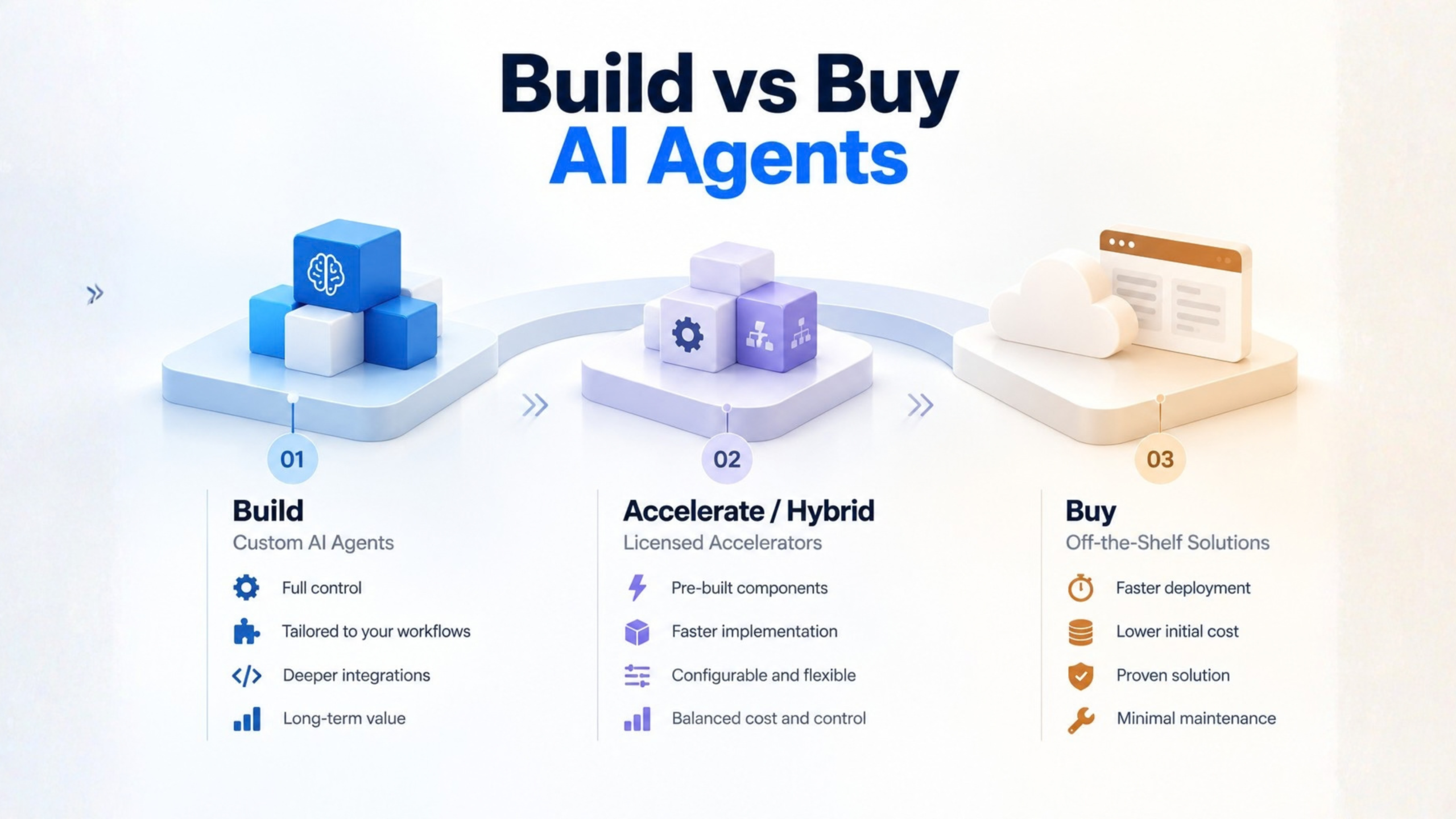
- Buy when the task is common, supported, and well served by a packaged environment, and when controls and economics already fit.
- Adapt an accelerator when a reusable starting point covers meaningful work, but licensing, maintainability, and exit rights still need scrutiny.
- Build when proprietary logic, legacy integration, action control, specialized data boundaries, or product differentiation cannot be met well enough by configuration.
- Combine when the interface or infrastructure is commodity, but workflow intelligence is not.
Then roll it out in this sequence:
- Map one workflow and risk boundary
- Baseline costs and quality
- Compare a configured package, an accelerator, and a narrowly scoped custom approach against the same tests
- Pilot with limited users and permissions
- Review security, business outcome, and total cost of ownership
- Expand permissions and volume only after criteria are met
- Establish monitoring, ownership, documentation, and an exit plan
That is not a universal numeric threshold. It is a decision process.
Where Fx31 Labs fits, honestly
Fx31 Labs publicly describes AI development, custom AI solutions, data engineering, evaluation and MLOps integration, and work from ideation through deployment and ongoing optimization. Its enterprise software materials emphasize integrating bespoke solutions with existing software. Its Generative AI & AI Agent Solutions offering is positioned around custom applications, retrieval from enterprise knowledge, agents and copilots, workflow automation, integration, and governance.
The practical value of an AI agent development company is not that it should automatically push you toward custom work. It is that it can help diagnose the workflow, test whether an existing copilot or accelerator is enough, and engineer the missing integration, evaluations, and handoff when it is not.
That is the right posture for custom AI development vs off-the-shelf AI tools: not ideology, just fit.
FAQ
Does a custom agent require training our own LLM?
No. Custom development often means owning the workflow, tools, retrieval, evaluation, and integration while using an existing model.
Is an off-the-shelf copilot incapable of taking actions?
No. Some copilots can be extended with specialized agents and workflows. Evaluate the configured product and permissions, not the label.
What is the difference between an accelerator and a platform?
An accelerator is a reusable starting solution or set of components. A platform provides underlying building, hosting, or governance capabilities. An offer can include both.
Is buying automatically faster or safer?
Not automatically. Buying can shorten initial setup, but permissions, integration, testing, and rollout still take work. Security depends on the implementation and operating controls.
When is hybrid preferable?
When common infrastructure and interfaces can be purchased, but the organization needs to own differentiated decision rules, data access, orchestration, or integration.
How do we prevent an agent from acting on malicious documents?
Treat retrieved content as untrusted, limit tool permissions, enforce authorization outside the model, gate consequential actions, log behavior, and test indirect prompt-injection scenarios. No single prompt is a complete defense.
How do we know it pays off?
Compare process outcomes with a baseline, include integration, usage, oversight, and maintenance in lifecycle cost, and measure successfully completed work and business effects rather than demonstrations or raw output volume.
The strategic lesson is simple: The right AI agent strategy is rarely about choosing between “build” and “buy” in absolute terms. It is about deciding which capabilities are strategic enough to own, which can be safely purchased, and where a hybrid architecture provides the right balance of speed, control, cost, and flexibility. Start with one measurable workflow, establish security and governance boundaries, compare approaches against the same evaluation criteria, and expand only when the evidence supports it.