
Designing the Right Database Architecture for App Data
Database architecture is the very essence of a digital application that gets through the eye of a needle today. A strong and flexible database layout makes it possible for the application to go through the data operations quickly while expanding to the growing number of users. In simple terms, database architecture is the map that lays out the ways data will be represented, connected, and made available through the application. The proper understanding of this map is very important for the development of advanced apps, which are capable of coming on the market and giving in-office support for years. For instance, during the whole development process, if database architecture is the main focus, then the chances of high-cost reworking afterward will be lower.
Understanding Database Architecture
Database architecture contains the models and regulations that govern the organization and access of data. Properly defined architecture from the beginning always takes into account, among others, the scalability and security of the system. For example, queries can be accelerated by the use of normalized schemas and the right indexes while a flexible schema is created accordingly to the changing requirements. A contemporary database architecture can involve microservices and distributed caches for different types of data workloads. Application database design that is done the right way guarantees data consistency and performance through the establishment of clear requirements up front and anticipating how the database will grow along with the application. This kind of planning acts as an effective way of defining the core database architecture.
Key Principles of App Database Design
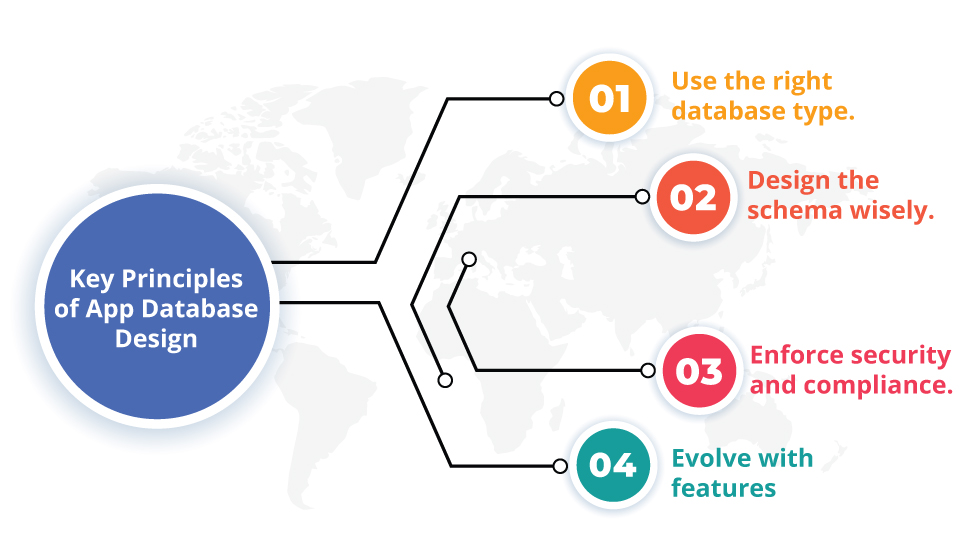
Designing an app database means tailoring the architecture to the app’s specific needs. For example, defining clear requirements with stakeholders ensures the database will support required features now and later. It’s equally important to focus on performance and user experience: clean code, proper documentation, and optimized schemas help the app run quickly and reliably. In all cases, align your app database design with your application logic to maintain consistent performance. Additionally, good app database design should evolve with new features over time. In other words, each decision shapes the database architecture needed by the app.
Some best practices include:
- Use the right database type. Choose relational databases for structured data or NoSQL for flexible, high-scale scenarios.
- Design the schema wisely. Normalize data to eliminate redundancy, but denormalize or use caching in read-heavy apps to optimize performance.
- Enforce security and compliance. Protect sensitive data with encryption, access controls, and least-privilege permissions.
- Evolve with features. As new features are added, adapt your app database design to keep the schema aligned with the app’s logic.
Our custom backend development services integrate these principles. We optimize schemas and implement caching so apps handle heavy load while maintaining data integrity.
Scalable Database Solutions for Apps
Apps today require scalable database solutions to handle growing users and data. Scalable database solutions often rely on distributed systems and cloud services that can expand on demand. Scalability means the database can expand seamlessly with load. Key strategies include sharding (splitting data across servers) and replication (using read replicas). Sharding distributes data by key to balance load, and replication lets the primary database handle writes while replicas serve reads.
Some patterns for scalability:
- Distributed Caching and Polyglot Stores. Use in-memory caches and multiple data stores (SQL and NoSQL together). These form key scalable database solutions by leveraging each system’s strengths.
- Consult professionals. Consider professional database development services to design and implement robust, scalable database solutions tailored to your needs.
In short, these strategies form the blueprint of a scalable database architecture.
Leveraging Cloud Database Architecture
Moving to the cloud brings extra flexibility and reliability. A well-designed cloud database architecture ensures high availability and data integrity. Cloud providers offer managed database services (e.g., Amazon RDS, Google Spanner) that automatically scale compute and storage. They also support multi-zone clusters and automated failover, so your app can survive outages.
Key cloud practices include:
- Use managed DB services. These services handle much of the heavy lifting (backup, replication, autoscaling) so teams can focus on features.
- Architect for redundancy and autoscaling. Deploy databases across multiple availability zones and set up auto-scaling policies. This way, the system can adjust resources on demand and recover quickly from failures.
As one industry source notes, “a well-designed cloud database architecture ensures scalability, data integrity, and availability”. Many companies use hybrid or multi-cloud setups, but the core goal remains: ensure your database architecture handles growth seamlessly. Our Cloud & DevOps Services help clients implement these architectures so their apps stay robust in the cloud.
Data Storage Best Practices
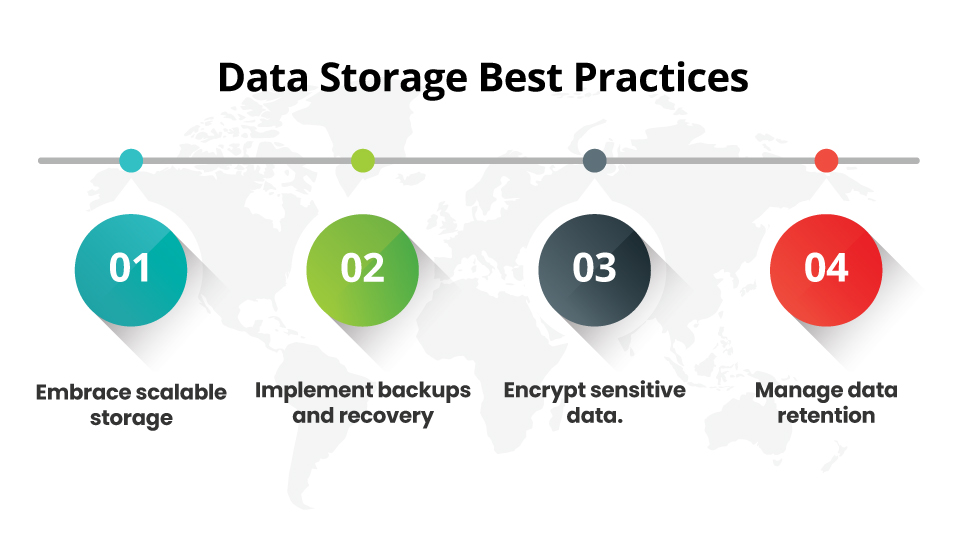
Following data storage best practices is fundamental to keeping data secure and accessible. For example, even a strong database architecture relies on disciplined storage strategies (like backups and encryption) to protect data. Key guidelines include:
- Embrace scalable storage. Use cloud storage (Amazon S3, Azure Blob, etc.) for large files and backups. These services are highly scalable and cost-effective for storing vast data.
- Implement backups and recovery. Regularly back up your database to off-site or cloud storage and test your restore process. This ensures you can recover from outages or corruption.
- Encrypt sensitive data. Encrypt data at rest and in transit using strong protocols. Encryption protects your data even if the storage is breached.
- Manage data retention. Classify and archive old data that’s no longer needed. Removing stale data is a key part of data storage best practices.
By following these and other data storage best practices, you minimize risk and ensure continuity. All these measures should align with your overall database architecture to maintain coherence. For example, adopting rigorous data storage best practices is crucial for enterprise systems.
Database Management for Apps
Once the app is live, ongoing database management for apps keeps performance optimal. This includes:
- Monitoring and alerting. Track query times, slow logs, and server metrics. Alerts for anomalies (e.g., slow queries or high latency) let you act before users are impacted.
- Index and query optimization. Regularly review and tune indexes. Rewrite slow queries and archive old data to improve performance.
- Maintenance and updates. Apply database software updates and security patches in a controlled way. Automate routine tasks (like vacuuming or defragmenting) to avoid manual errors.
In short, database management for apps is an ongoing process integrated into the app’s lifecycle. In doing so, we maintain the underlying database architecture over time.
FAQs
1. What is database architecture?
It’s the high-level blueprint of how an app’s data is stored and accessed. Good database architecture (with clear schemas, indexes, etc.) enables fast queries and easy scaling.
2. How do I scale an app’s database?
Use scalable database solutions like sharding data across servers or adding read replicas. Many apps use cloud databases or NoSQL services for auto-scaling. Planning these from the start is key.
3. When should I use SQL vs. NoSQL?
Use SQL (relational) if you need complex transactions and strong consistency. Use NoSQL for very large datasets or flexible schemas. Often, apps use both SQL for core data and NoSQL or caches for heavy read operations.
4. What is cloud database architecture?
It refers to designing databases for cloud environments. Best practices include using managed DB services, multi-zone deployment, and auto-scaling. In essence, cloud database architecture is about ensuring reliability and performance in the cloud.
5. What does database management for apps involve?
It involves maintaining the database after launch: monitoring, backups, updates, and optimizations. Continuous database management for apps, aligned with your database architecture, ensures the app remains fast and reliable.
Ultimately, strong database architecture, diligent database management, and strict data storage best practices ensure the app remains scalable and reliable.